If you want to write the perfect content with zero grammatical errors, you must possess excellent literature knowledge. But is it humanely possible? Of course not. This is when bots come in. Chances are that even then, it might not be possible to generate error-free content.
With AI-powered software like Quillbot and Grammarly, you can write the finest content with minimal and even zero mistakes.


The use of AI in Quillbot and Grammarly will ease the workflow by producing various features like paraphrasing, proofreading, and punctuation.
I used both Quillbot and Grammarly, and the results turned out to be impressive. Wanna know my verdict? Check to know more.
Quillbot vs Grammarly: Quick Verdict
Quillbot is an AI-powered writing tool, and it helps you paraphrase content and also helps you check Grammar. Like Grammarly, it also offers a grammar checker and plagiarism tool, but it is not as powerful as Grammarly. You can choose Quillbot if you’re looking for a reliable paraphrasing tool.
Grammarly is robust AI-powered writing assistant software available for all devices and apps. It offers multiple beneficial tools such as grammar checker, clarity, plagiarism checker, tone detection, etc. In comparison to Quillbot, Grammarly has got a lot to offer. If you are a student, professional, or someone looking to polish your writing — Grammarly is for you! If you’re looking for a reliable AI-powered writing assistant, choose Grammarly.
With added benefits like a summarizer tool, plagiarism checker, and tone detection in Quillbot and Grammarly, the writing experience was immaculate, so I wrote a comparison review.
In this article, you will learn everything about Quillbot Vs Grammarly, including the best features of Quillbot and Grammarly, the suitability of Quillbot and Grammarly, and pricing plans of Quillbot and Grammarly. Ultimately, this article will help you make the right decision in choosing the best!Quillbot vs Grammarly (Overview of the Ultimate Battle)
Writing can be a tedious process when you have to develop perfect grammar content with zero errors and mistakes constantly. I mean, who even thinks grammatically correct all the time?
At least, not me. There are instances where I would write something in my casual English, and somehow it gets grammatically incorrect when being written, but it felt right in my mind.
Have you been in similar situations? Well, I am going to break down Quillbot and Grammarly, which are two outstanding AI-induced grammar and writing tools that will improve your writing.
Let me give an overview of Quillbot and Grammarly so that you get to know these bad boys!
What is Quillbot?
Known for its fascinating paraphrasing abilities, Quillbot can catch incorrect sentences and turn them into carefully written, grammatically correct sentences.
Using Quillbot is a butter-like smooth experience. You have to copy and paste the content and click a button. Boom, you are good to go with the best-rephased content.
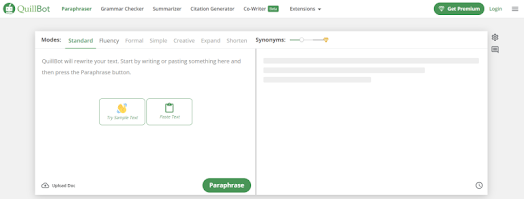
In Quillbot, you get plenty of writing modes which include standard, fluency, formal, simple, and creative. Let’s say you’re writing a cover letter for your boss, of course, you want to sound nice, but you’ll use informal language.
In fact, you can also cross-check what each mode sounds like by comparing two modes in Quillbot so that you can pick the most appropriate sentence. It’s a win-win situation.
In such cases, Quillbot comes to the rescue and rewrites the content out loud for you. In fact, you get the written scores entirely through skill.
How cool is that?
Even if you write a letter on a topic and do not reach the number of points you will get from your teacher, Quillbot has your back because it has special features such as Presentation and Concise, which can expand or shorten any sentence or phrase you want.
What’s more?
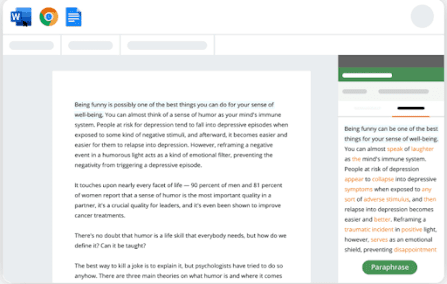
Quillbot is supported via Google Docs, a great advantage for students and freelance writers since most of them use Google Docs for their school essays, writing gigs, and projects, respectively.
What is Grammarly?
An AI-integrated tool that helps in modifying, correcting, and proofreading the desired content is Grammarly. It also provides other significant features like advanced genre-specific suggestions.
In case you have written content with concise words, Grammarly can help suggest relevant words that can match the tone of the content. Yes, you heard me.
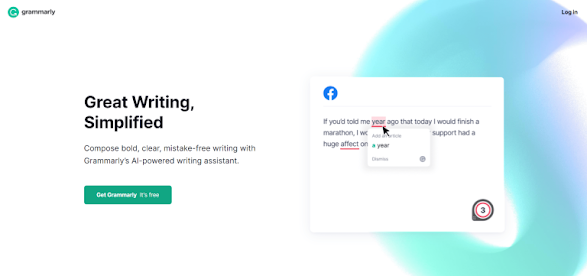
You can kiss goodbye to all the mistakes in your content once you have installed Grammarly!Best features of Quillbot and Grammarly
Although Quillbot and Grammarly offer similar benefits, some features make each platform outstanding. Let me quickly name it down below:Quillbot key features
- Paraphrasing tool
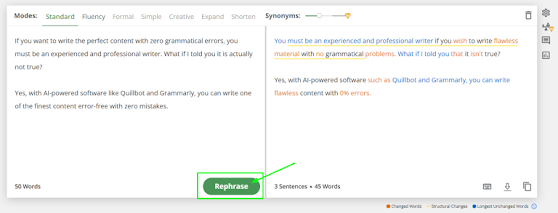
Paraphrasing is one of Quillbot’s most talked about features and does the platform justice; Every sentence you type in Quillbot will be instantly paraphrased.
- Writing modes
Furthermore, the content can be transformed in different modes depending on the type of content that you are expecting to deliver. I mean, there are 7 unique modes in Quillbot.
- SEO optimization tools
Quillbot can also help in optimizing your content for SEO purposes if you are running a business online and are desperate to bring in a generous amount of traffic.
With Quillbot, you can be sure that Quillbot has the right SEO tools to optimize your content.
- Summarizer tool
Are you wondering what a summarizer tool could be? As the name suggests, it summarizes and emphasizes the must-read items.
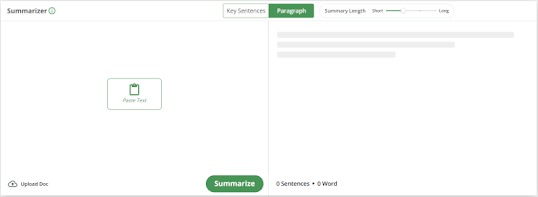
To my surprise, Quillbot’s content exceeded my expectations.
- Thesaurus support
One of the most anticipated features in a grammar-checking tool is Thesaurus support, and Quillbot has it. AI powered thesaurus works like a miracle and provides similar words.
Grammarly Key Features
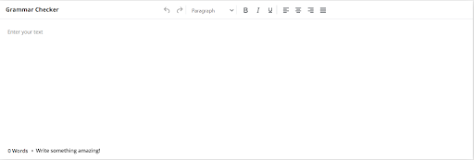
- Grammar checking tool
Grammarly is known for its powerful sentence checking that can be relied upon and applied to any type of content, regardless of the genre or format it is based on.
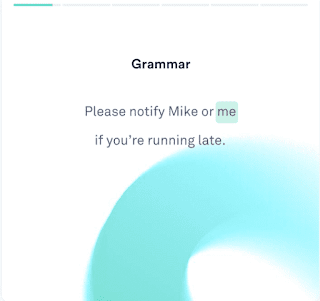
The grammar checking spots all the errors in real-time copywriter instantly catches any errors and improves the content instantly. and instantly enhances the content.
- Advanced genre-specific suggestions
Even if you can write the content in a specific format, the third-party verifier cannot understand that format and cannot replace the specific language.
With Grammarly, you can forget about all this because the special tips are very effective and accurate.
- Tone detection
Wouldn’t it be great if you could get feedback from people right now on how your content sounds?
Grammarly has the outstanding feature of tone detection, which can detect the tone of your content within seconds and tell you if it is formal or admiring worrying or emotional.
- Plagiarism checker
Most grammar-checking software does not provide a plagiarism checker, but Grammarly had other ideas; why? Well, Grammarly has a plagiarism checker that can highlight and show if there is scraped duplicated content present in your content.
In general, online publishers want plagiarism checkers not to be penalized for copying content elsewhere. Even teachers use it to ensure that students’ data and work are not at risk.
- Word enhancement
One of the most underrated features of Grammarly is word enhancement.
While not a useful feature in itself, users can use Grammarly to refine and improve their writing, as most of the lessons demonstrate the necessary lessons.
It is evident that Grammarly definitely works towards improving its users’ English better. Who should use Quillbot?
Quillbot is suitable for:
- – Content publishers who require SEO optimization tools.
- – Students who demand a paraphrasing tool to write essays.
- – Those who want to expand/shorten the content to meet the word count.
- – People who need content to write a specific content.
Who should use Grammarly?
Grammarly is suitable for:
- -Anyone who needs personal AI writing service.
- – Writers, bloggers, and content marketers need good writing tools.
- – Content publishers who require plagiarism checkers neglect duplicate content.
- – Marketing agencies that demand proofreaders and editors can use Grammarly.
Quillbot vs Grammarly: Pros & Cons
Here are the benefits & drawbacks of using Quillbot and Grammarly.Quillbot Pros
- AI paraphrasing tool allows you to rewrite content quickly.
- Get a citation generator in the free plan of Quillbot.
- Quillbot also works with MS Word and Chrome.
- You can use the summarizer tool to summarize your text quickly.
- Affordable pricing if you choose to pay annually.
Quillbot Cons
- Quillbot does not have a tone detector like Grammarly, so you can’t know if your text is formal, creative, or simple.
- You can only check 20 pages per month for plagiarism.
Grammarly Pros
- You can see all the major mistakes on your document because Grammarly underlines them in red, and you can change them in real-time.
- It offers you advanced suggestions that can help you write better.
- The Grammarly business plan can help give your brand a boost with its brand tone, style guides, snippets, and analytics features.
- You can do unlimited checks for plagiarism with the Grammarly premium version.
- You can use Grammarly Chrome Extension to make changes to your document without visiting the Grammarly web app.
Grammarly Cons
- It is expensive compared to Quillbot for individuals.
- It does not have a summarizer tool like Quillbot.
Pricing: Quillbot vs Grammarly (2024)
Offering incredible benefits and features? Well, that must be pricey.
If you thought this, you might be partially right but guess what?
Here on Keys-Shop.in, we offer Quillbot and Grammarly Lifetime Plans.
Where you did not need to pay any monthly or yearly subscription, just buy it once and use it for a lifetime.
Check the below link for the Price and more details:-
Quillbot For lifetime – https://keys-shop.in/product/quillbot-premium-making-writing-painless/
Grammarly For Lifetime – https://keys-shop.in/product/grammarly-premium-elevate-your-writing/